In short
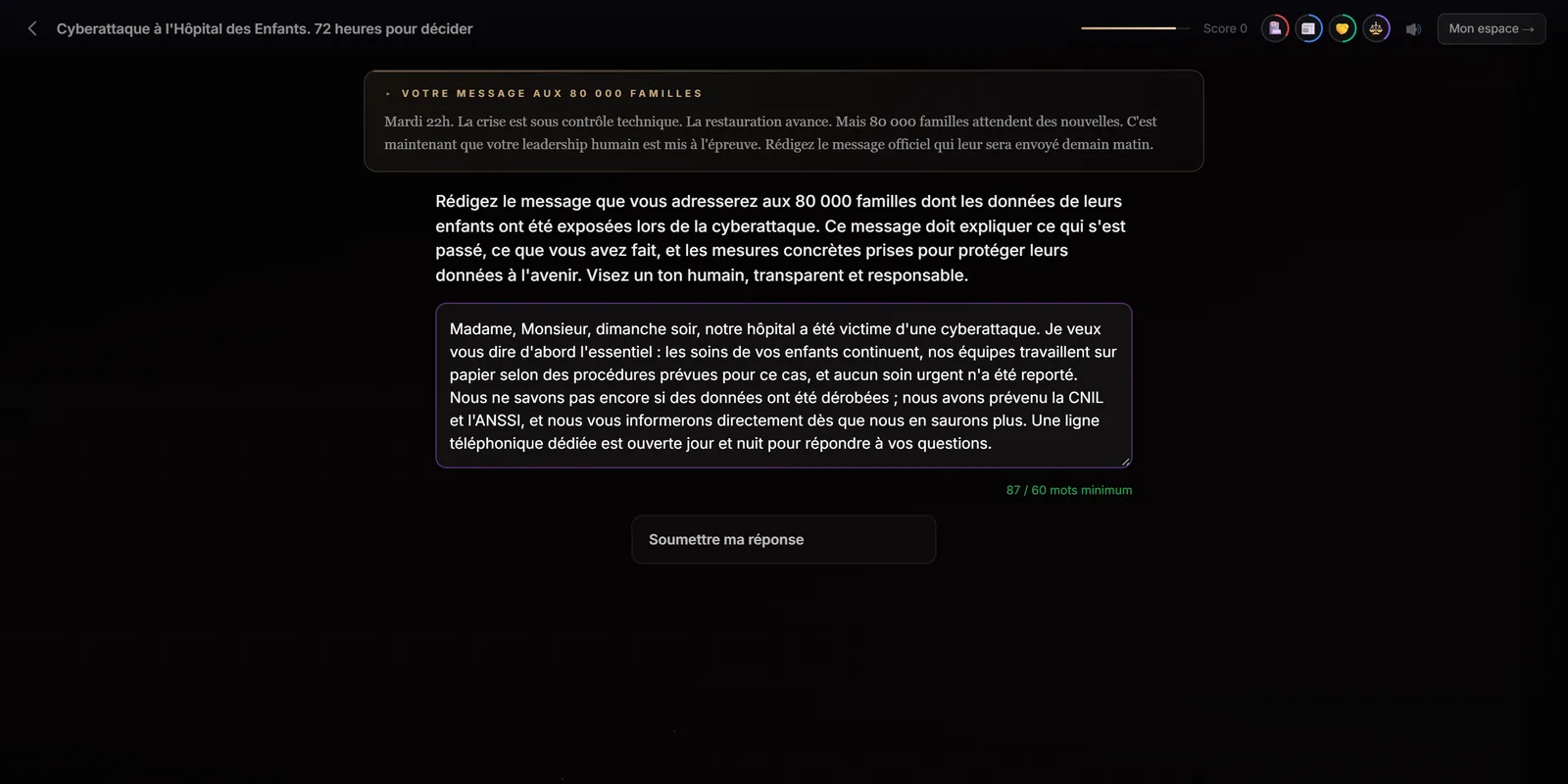
The open question asks learners to write their own answer, with a minimum word count. Immersio's engine analyses it against the concepts a good answer should cover and the pitfalls to avoid, defined for the scene, then shows a mark out of 10, written feedback, the concepts covered and those to work on. The engine places one at expert level; you can require one at any level.
At a glance
- What the learner does
- Writes their answer in free text.
- Analysis
- Expected concepts and pitfalls, defined for the scene.
- Measured
- Mark out of 10, concepts covered and to work on.
- In the engine
- One at expert level, or on request at any level.
- Editable by hand
- Not in the training provider editor; through an improvement instruction.
Why have learners write?
Because producing an answer demands far more than recognising one. To write, learners have to retrieve the ideas themselves, rank them and choose their words: the top of Bloom's taxonomy, “evaluate” and “create”. It's also the format closest to real work, where people write messages, reports and arguments.
How is the answer analysed?
Every open question comes with criteria defined when the scenario is created: the concepts a good answer should cover (here: transparency about the facts, sincere apologies, concrete corrective measures, a dedicated point of contact…), the pitfalls to penalise (downplaying the facts, unrealistic promises, technical jargon, a defensive tone) and, if needed, a note on the context. Immersio's engine relies on these criteria to analyse the answer.
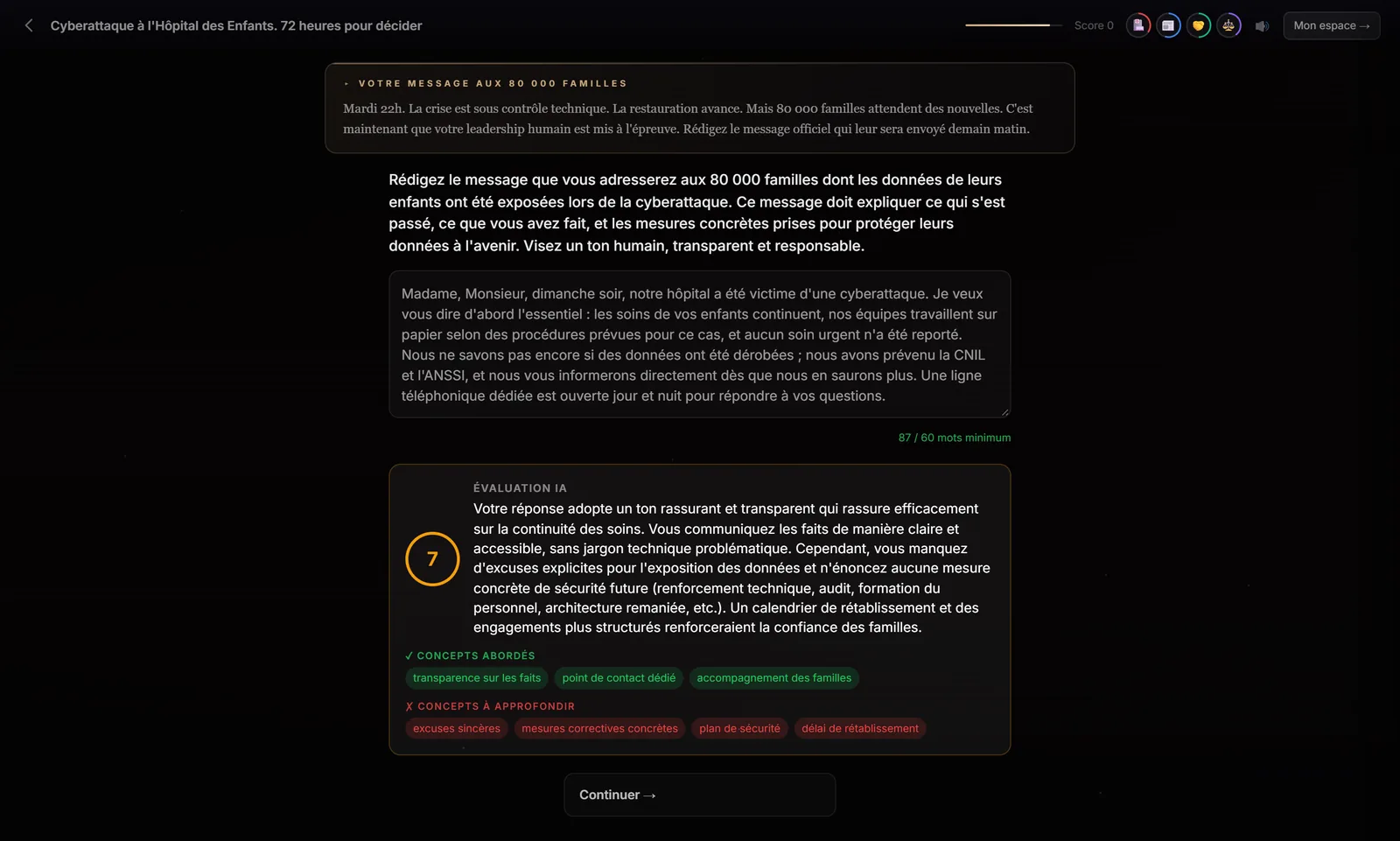
The analysis doesn't stop at a mark. It tells learners what works in their answer and what's missing, in concrete terms. Their answer and its analysis are included in the end-of-game debrief.
When should you use an open question?
- Crisis communication: the press release, the message to customers, the announcement to staff.
- Management: wording a correction, recognition, a difficult decision.
- Sales and advice: writing a reply to an objection, a reasoned recommendation.
- End of a path: having learners justify the trade-off made in a dilemma.
An open question takes more effort than a click: keep it for the key moment of the scenario, where wording really matters. One per scenario is usually enough.
What the open question doesn't do
Automatic analysis is formative feedback, not certification: it relies on the scene's criteria and can misjudge a highly original answer. For a high-stakes assessment, plan a moment where the trainer goes over the answer with the learner. In the training provider editor, the question and its criteria can't yet be edited field by field: you rework them through an improvement instruction on the scenario.
Frequently asked questions
How is the learner's answer marked?
Immersio's engine, which relies on an artificial intelligence model, compares the answer with the expected concepts and pitfalls defined for the scene, then returns a mark out of 10, written feedback and the list of concepts covered and to work on.
Is there a minimum length?
Yes. Each open question sets a minimum word count, shown by a counter; the answer can't be submitted before reaching it.
What happens to the written answer?
It's analysed immediately, then included, with its analysis, in the personalised end-of-game debrief.
Create your first scenario
A training provider account gives you the studio, the scene formats and all four matrices. 7-day free trial, no credit card required, with 3 scenario generations to judge the result on your own topic. Scenarios are generated in French.
Create a training provider accountPrefer to compare first? See pricing · How it works